
Introduction
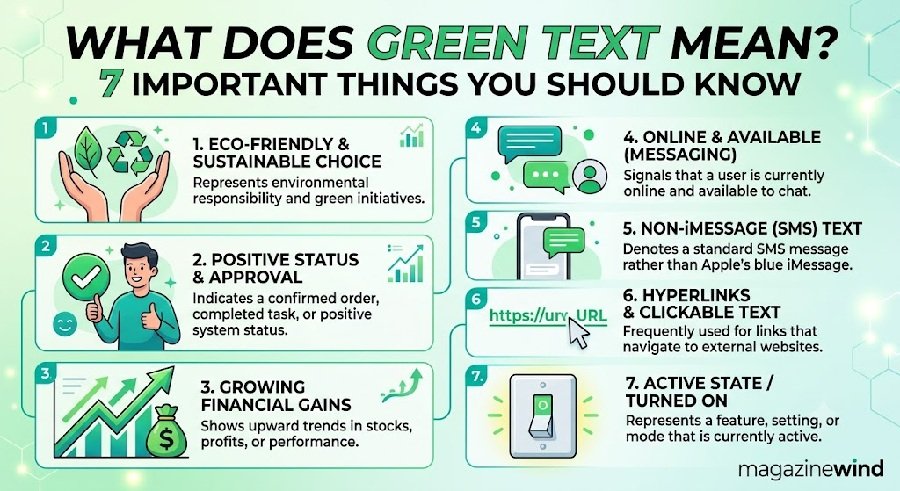
What does green text mean? On an iPhone, green text means the message was sent as a standard SMS, MMS, or RCS message instead of through Apple’s iMessage service. In short, it tells you the message did not go through Apple’s own messaging system.
The most common reason is that the person you are messaging does not have an Apple device. It can also happen if iMessage is turned off or temporarily unavailable on either phone.
On an iPhone, the Messages app uses two colors:
- Blue bubble: The message was sent using iMessage, Apple’s own messaging service.
- Green bubble: The message was sent using SMS, MMS, or RCS, which are standard messaging formats used by all phones.
Apple explains that green text appears when the message is “sent using RCS or MMS/SMS instead of iMessage” . This is not an error. It is simply how the iPhone shows that a different type of message is being used.
Why Do iPhone Messages Turn Green?
There are three main reasons your iPhone messages may turn green:
- The other person does not have an Apple device. If you are texting someone with an Android phone, the message cannot use iMessage. It falls back to SMS or RCS, which appears green .
- iMessage is turned off. If iMessage is disabled in your Settings or the recipient’s Settings, messages will send as green text .
- iMessage is temporarily unavailable. Sometimes iMessage servers have issues, or your internet connection is down. When this happens, the iPhone sends the message as a standard text instead, which shows up green .
Green Text vs. Blue Text: What Is the Difference?
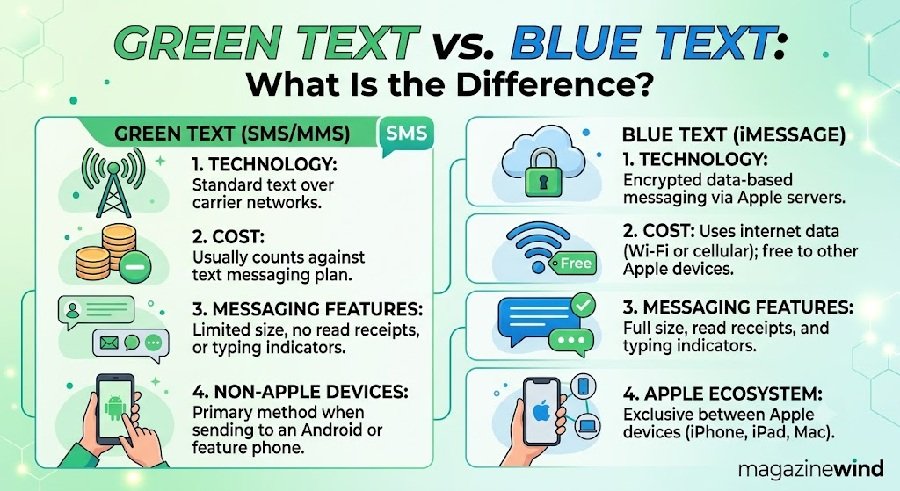
The color difference is not just cosmetic. It tells you which features will work in your conversation.
Before iOS 18, green text between iPhone and Android meant low-quality images and missing features. With RCS support added in iOS 18, some of these limitations have improved, but the bubble is still green .
Does Green Text Mean Someone Blocked You?
No. Green text does not mean you have been blocked.
This is a common myth. Green bubbles simply mean iMessage is not being used. If someone blocked you on iMessage, your messages would still appear blue, but they would not be delivered or would show as “Not Delivered.”
Green text is about the technology being used, not the status of your relationship with the recipient.
What Does Green Text Mean in Texting and Social Media?
Outside of iPhone messaging, “green text” has another meaning.
On the website 4chan, users type a “>” symbol before a line of text to make it appear green. These “greentext” stories are short, anonymous anecdotes, often written in a distinctive, deadpan style . They became popular around 2010 on the /r9k/ board and later spread to Reddit and other platforms .
So if you see “greentext” on social media, it usually refers to this 4chan storytelling format, not iPhone messages.
How to Fix Green Text Messages on iPhone
If you want your messages to appear blue, here is what you can do:
- Turn on iMessage. Go to Settings > Messages and make sure iMessage is enabled .
- Check that the recipient has an Apple device. If they use Android, messages will stay green. There is no way to change this.
- Make sure you have an internet connection. iMessage needs Wi-Fi or cellular data. If your connection is poor, messages may fall back to SMS.
- Restart your iPhone. Sometimes a simple restart fixes temporary iMessage glitches.
- Check Apple’s System Status page. If iMessage servers are down, messages will turn green until service is restored.
Frequently Asked Questions
1. Can I make green text messages blue?
Only if the other person has an Apple device and iMessage is enabled on both phones. If they use Android, the bubble will stay green .
2. Why do my messages turn green sometimes but not always?
This usually means iMessage is temporarily unavailable, perhaps due to a weak internet connection. When the connection improves, messages may go back to blue .
3. Do green text messages cost money?
SMS and MMS messages may count against your cellular plan’s text limits. iMessage uses data or Wi-Fi and does not count as a text message .
4. Is green text less secure?
Yes. Standard SMS and MMS are not end-to-end encrypted. iMessage is encrypted. RCS is working toward encryption, but it is not always available across all networks yet .
5. Why do group chats turn green?
If even one person in a group chat does not have an Apple device, the entire chat may switch to MMS or RCS, turning all bubbles green .
6. Can Android users see blue bubbles?
No. iMessage is exclusive to Apple devices. Android users see their own message colors based on their messaging app, but they cannot send iMessage .
7. Does green text mean the person does not like me?
No. Green text only reflects the type of phone or messaging service being used. It has nothing to do with personal feelings .
8. What is the “green bubble ick”?
This is a slang term used online to describe some iPhone users’ negative reaction to seeing green bubbles, often associated with dating. Surveys suggest some people judge others based on phone choice, but this is a social phenomenon, not a technical issue .
9. Will green text ever go away?
Apple has added RCS support in iOS 18, which improves the experience of green messages. However, the green color remains to distinguish iMessage from other formats .
10. Can I turn off green text?
You cannot change the color, but you can ensure iMessage is on so that messages between Apple devices stay blue. Messages to Android users will always be green .
Conclusion
So, what does green text mean? On an iPhone, it simply means the message was sent as a standard SMS, MMS, or RCS message instead of through iMessage. It usually happens because the other person does not have an Apple device, or because iMessage is turned off or unavailable .
Green text is not a sign that you are blocked, and it is not an error. It is just how the iPhone shows that a different messaging technology is being used. With RCS support now available on iPhones, green messages between iPhone and Android have improved, even if the color has not changed.