
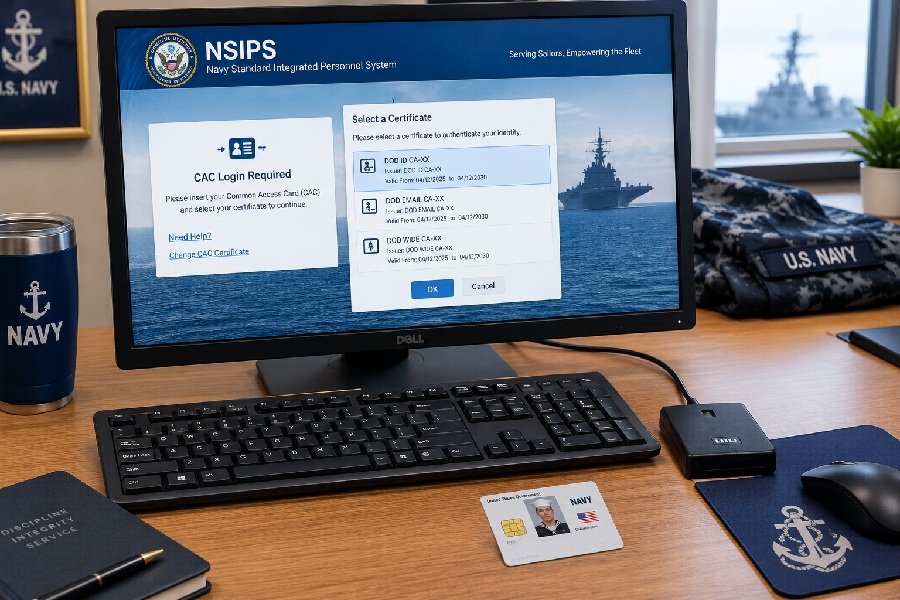
If you are a Navy Sailor trying to check your Electronic Service Record (ESR), review training data, or handle personnel tasks online, you have probably heard about NSIPS Quick Links. These links are your gateway to the Navy Standard Integrated Personnel System, the official platform where your pay and personnel records live. This guide explains what NSIPS is, how the quick links work, and how to access your account safely without running into common login headaches.
What Is NSIPS?
NSIPS stands for the Navy Standard Integrated Personnel System. It is the Navy’s single, field-entry electronic pay and personnel system for all active and reserve Sailors . Think of it as the official digital filing cabinet for your military career.
The system gives Sailors 24-hour access to several important records, including:
- Electronic Service Record (ESR) – your official source for pay and personnel information
- Training data – records of completed courses and qualifications
- Career counseling records – documentation related to your career progression
NSIPS is available worldwide, both ashore and afloat. It is deployed on ships and can sync data with the shore network when connectivity allows . This means even Sailors at sea can access their records through the shipboard NSIPS server.
What Are NSIPS Quick Links?
When people search for NSIPS Quick Links, they are usually looking for the fastest way to reach the official NSIPS login page or the self-service menus that let them manage their accounts. The term itself is not an official Navy product name, but it describes the practical shortcuts Sailors use every day: the direct URLs, the self-service unlock options, and the help desk contacts that get you back into the system.
In practice, NSIPS Quick Links refer to:
- The main NSIPS access portal for logging in with your CAC
- The ESR Self-Service links for new users and account unlocks
- The SAAR (System Access Authorization Request) links for requesting additional roles
- The NSIPS Help Desk contact information when self-service does not work
These are not secret or hidden pages. They are standard entry points that every authorized Sailor should know how to find.
Official NSIPS Login and Access
Before you click anything, one rule matters more than all others: always use official Navy websites. The verified NSIPS URL is https://www.nsips.navy.mil . Older documents may reference different addresses, such as nsips.nmci.navy.mil or nsips.cloud.navy.mil, but the Navy has updated its access points over time.
Access to NSIPS requires two things:
- A Common Access Card (CAC) – you cannot log in without it when accessing from the internet
- A CAC reader and the proper software – if you are not on an NMCI workstation, you need an external card reader and ActivClient software installed
When you reach the login page, your browser will ask you to verify your PKI certificate. Choose the DoD CA-XX certificate, not the email certificate. This is a common stumbling block for first-time users .
How to Access NSIPS Step by Step
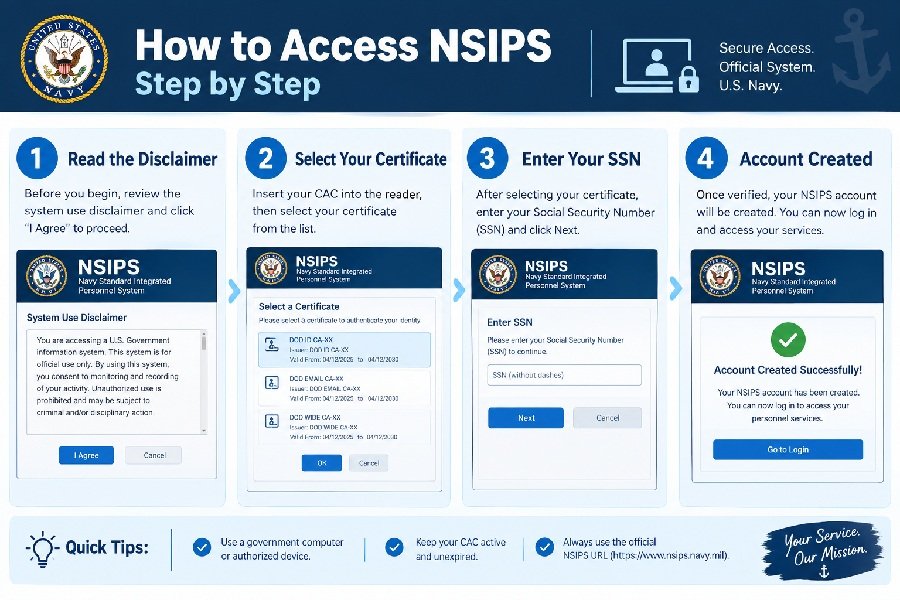
Here is the standard process for establishing and accessing your ESR account from the internet.
First-Time Account Creation
- Go to the official NSIPS website using your CAC-enabled browser.
- Read the security disclaimer, check the box, and select Agree.
- Select ESR Self Service (New Users).
- When prompted to verify your PKI, choose the DoD CA-XX certificate.
- Enter your Social Security Number. Your name should fill in automatically.
- Enter your birth date, a .mil or .gov email address, and your phone number.
- Click Create Self Service Account.
- Close the confirmation window when your account is created successfully .
Returning User Login
- Go to the NSIPS website.
- Select your User ID (your name) from the list.
- Read the security disclaimer, check the box, and select Agree.
- Click Logon.
- Under Navy Standard Integrated Personnel System, select ESR Self-Service Access .
For Sailors on ships, the afloat process is slightly different. You access the shipboard server at http://nsipswebafloat and create a second self-service account using your name in LAST, FIRST MIDDLE format .
Common NSIPS Login Problems and Solutions
Even with the right links, access issues happen. Here are the most common problems and what to do about them.
Account Locked or Error 0359
If your account is locked, use the NSIPS Self-Service (Unlock) link on the NSIPS homepage. If you see Error Code 0359, that means you need to use the NSIPS Self-Service (New Users) link instead, which re-associates your account .
Secure Connection Failed
This browser error often relates to certificates. Try these steps in order:
- Clear your browser cache and cookies
- Restart your browser
- Install or update the DoD root certificates through MilitaryCAC
- Clear your SSL state in Windows Internet Options
- Try a different browser entirely
CAC Not Recognized
If the website does not detect your CAC, check that:
- Your card reader is properly connected and drivers are installed
- ActivClient is running
- You selected the correct certificate (DoD CA-XX, not email)
- Your CAC has not expired
General Access Issues
The Navy Reserve recommends a simple troubleshooting sequence: ensure your NSIPS account is unlocked and active first, then try different browsers, update your operating system, try a different computer, or use an NMCI machine at a local NOSC if possible .
Tips for Safe and Secure NSIPS Access
Your NSIPS account contains sensitive personnel and pay information. Treat it with the same care you would give your bank account.
- Never share your password with anyone, including coworkers or supervisors. Your CAC PIN is personal for a reason.
- Only use official Navy URLs. Do not follow links from unofficial emails, forums, or third-party websites claiming to offer “quick access.”
- Log out completely when you finish, especially on shared computers.
- Keep your contact information updated in NSIPS so account recovery and notifications reach you.
- Use the official help desk if something feels wrong. The NSIPS Help Desk can be reached at 1-877-589-5991 or NSIPSHelpDesk@navy.mil .
Access to NSIPS is restricted to authorized personnel with valid credentials and appropriate network permissions. If you cannot log in, the issue is usually account status or certificate configuration, not a problem you can solve by trying random links.
Frequently Asked Questions
What is the official NSIPS website?
The verified official NSIPS access point is https://www.nsips.navy.mil . Always confirm you are on a .mil or .navy.mil domain before entering credentials.
Do I need a CAC to log into NSIPS?
Yes. Internet access to NSIPS requires a Common Access Card and a CAC reader. If you are not on an NMCI workstation, you also need ActivClient software installed .
What should I do if I see Error 0359?
Error 0359 means your account needs to be re-associated. Use the NSIPS Self-Service (New Users) link on the homepage instead of the unlock option, and follow the prompts to re-establish your account .
Can I access NSIPS from home?
Yes, as long as you have a CAC reader, the proper certificates, and ActivClient installed on your personal computer. The process is the same as accessing from any non-NMCI machine .
Who do I contact if I cannot log in?
Contact the NSIPS Help Desk at 1-877-589-5991 (Option 2) or email NSIPSHelpDesk@navy.mil. Have your error message and CAC ready before you call .
Conclusion
NSIPS Quick Links are not mysterious shortcuts. They are the standard entry points to a system that every Sailor needs to know how to use. The key takeaways are simple: use the official NSIPS website, have your CAC and certificates ready, use the self-service unlock tools when you get locked out, and call the help desk when self-service fails. Your personnel records matter, so take a few minutes to make sure your access works before you urgently need it. Stay on official Navy domains, protect your credentials, and you will have reliable access to your ESR whenever you need it.