
You signed up for Instagram years ago and rushed through the signup. Maybe you picked the wrong year by accident. Or perhaps you made an account when you were younger and entered a fake birthday to get past the age check.
Now you want to fix it. How to change your age on Instagram is a question thousands of people search every month, and the answer is not always as simple as it sounds.
This guide walks you through the exact steps, explains why the option sometimes disappears, and tells you what to do when Instagram will not let you edit your birthday.
Can You Change Your Age on Instagram?
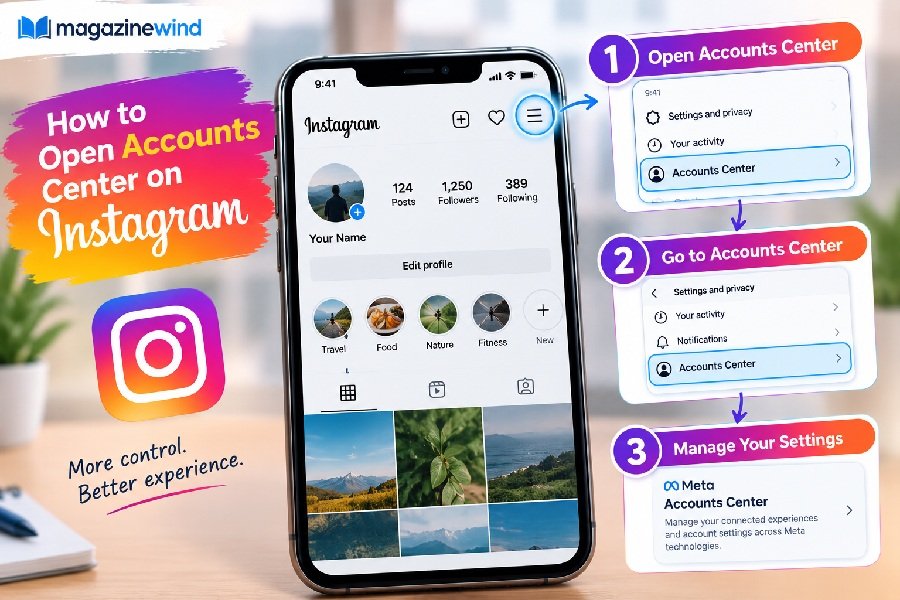
Yes, Instagram does allow users to edit their birthday. The setting lives inside Accounts Center, the central hub where Meta manages details across Instagram and Facebook .
But there is a catch. You can only change it a limited number of times. If you edited your birthday recently, Instagram may make you wait before you can change it again .
There is also a second catch: not everyone sees the same menu. Instagram is gradually rolling out Accounts Center to all users, so some people still need to use the older “Edit Profile” method instead .
How to Change Your Age on Instagram Using the App
Here are the verified steps for both iPhone and Android. The menu names below come directly from Instagram’s Help Center .
On iPhone
- Open Instagram and tap your profile picture in the bottom right.
- Tap the menu icon (three lines) in the top right.
- Tap Accounts Center.
- Tap Personal details.
- Tap Birthday (or Date of birth).
- Tap Edit and enter the correct date.
- Confirm and save.
On Android
- Open Instagram and go to your profile.
- Tap the menu in the top right.
- Tap Accounts Center, then Personal details.
- Tap Date of birth, then Edit.
- Update the date and save.
Important: If you do not see “Accounts Center” in your menu, skip to the troubleshooting section below. Your account may still be on the older settings layout.
How to Change Your Age on Instagram Using a Computer
You can also fix your birthday from a desktop browser. The layout looks different from the app, but the path is similar .
- Go to instagram.com and log in.
- Click More in the bottom left corner.
- Click Settings.
- Click Accounts Center.
- Click Personal details.
- Click Birthday, then Edit.
- Enter the correct date and confirm.
If you are using Instagram on a mobile browser instead, tap your profile picture, then Settings, then follow the same Accounts Center path .
What If You Cannot Change Your Birthday on Instagram?
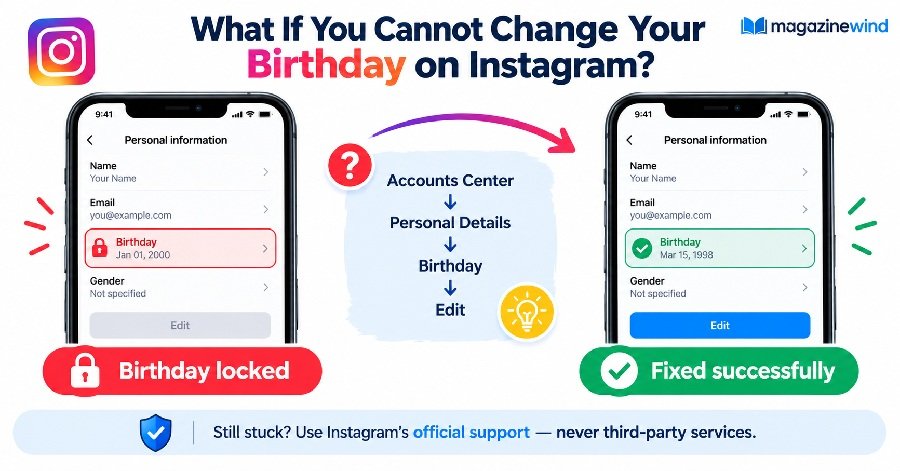
If the edit button is greyed out or missing entirely, you are not alone. Here are the most common reasons and what to do about each.
Reason 1: You Changed It Recently
Instagram limits how often you can edit your birthday. If you updated it within the last few days or weeks, you may need to wait before trying again .
What to do: Wait a few days and try again. There is no official workaround for this limit.
Reason 2: Your Account Is on the Older Layout
Instagram is still migrating some users to Accounts Center. If you do not see the option there, your account may still use the old settings .
What to do: Go to your profile, tap Edit Profile, and look for a birthday or personal information option there. If it is not visible, your account may require a different approach.
Reason 3: Instagram Wants Age Verification
If you are trying to change your age to something that seems inconsistent with your account activity, Instagram may ask you to verify your age before saving the change . This is part of Meta’s broader age assurance efforts, which use AI to detect accounts that may belong to underage users .
What to do: Follow the on-screen prompts. You may be asked to provide ID or complete a verification step. Do not submit fake documents.
Does Instagram Ask for Age Verification?
Yes. Instagram has expanded its age verification systems significantly. Meta now uses AI to analyze profile clues, such as birthday posts and school mentions, to estimate whether an account belongs to a teen or an underage user, even if the listed birthday says otherwise .
If Instagram suspects your account is misrepresenting your age, it may:
- Ask you to verify your age before changing your birthday.
- Temporarily limit certain features.
- Require proof of age to keep your account active .
The verification methods available vary by country and account. Instagram does not guarantee that every birthday change will be approved automatically.
How to Fix the Wrong Birthday on Instagram
If you entered the wrong birthday and the normal edit option is not working, here is the safest path forward.
- Try the Accounts Center method first. This is the official, verified route .
- If that fails, try the Edit Profile method. Some accounts still show birthday settings there.
- If both fail, use Instagram’s official support channels. Go to Settings > Help > Report a Problem. Describe the issue clearly. Do not search for third-party “birthday fix” services.
- If Instagram asks for verification, comply honestly. Submitting fake documents can lead to account suspension.
Instagram does not promise that every correction request will be approved. Be patient and use only official tools.
Can You Change Your Age to Access Instagram Features?
This is where many people get into trouble. Some users want to change their age to unlock features, bypass restrictions, or access content meant for older users.
Do not do this.
Instagram requires users to be at least 13 years old . Entering a false birthday violates Instagram’s terms. Meta’s AI systems are now specifically designed to catch accounts that misrepresent age, and accounts flagged by these systems can be deactivated until the user proves their real age .
The safest approach is simple: enter your real date of birth. If you made a mistake years ago, correct it through the official channels. Do not try to game the system.
Frequently Asked Questions
How do I change my age on Instagram?
Go to your profile, open the menu, tap Accounts Center, then Personal details, then Birthday. Tap Edit and enter the correct date .
Why can’t I edit my birthday on Instagram?
The most common reasons are: you changed it recently, your account is still on the older settings layout, or Instagram requires age verification before allowing the change .
Can I change my Instagram birthday more than once?
Instagram allows changes, but there is a limit. If you edited recently, you may need to wait before editing again .
Does changing my birthday affect my Instagram account?
Yes. Your birthday is tied to your account’s age settings. Changing it may affect which features are available to you, and it will sync across any accounts connected in the same Accounts Center .
Can I change my age on Instagram without Accounts Center?
Some users can still update their birthday through Edit Profile if Accounts Center is not available on their account. However, Instagram is gradually moving everyone to Accounts Center, so this fallback may not last .
Conclusion
How to change your age on Instagram comes down to one verified path: Accounts Center > Personal details > Birthday > Edit. If that option is missing, your account may be on the older layout, or you may have hit the change limit.
The most important rule is simple: use your real birthday. Instagram’s age detection systems are more advanced than ever, and trying to bypass them can put your account at risk. Fix the mistake honestly, use the official tools, and your account will stay safe.