
Update Software BVOSTFUS Python — if this phrase brought you here, you are likely stuck. Maybe a guide told you to run a command, but the download link was missing. Maybe your terminal threw an error you did not understand. Or maybe you simply want to keep your Python setup secure and up to date, and this name kept appearing in your search results.
Here is the honest answer you need before you type anything into your terminal: BVOSTFUS Python does not appear to be a real, verifiable software package. There is no official page, no download link, and no confirmed update method — and that is exactly why so many people end up confused.
This article will walk you through what the research actually shows, why this matters for your computer’s safety, and how to properly update real Python software the right way. No fake commands. No invented steps. Just clear, verified guidance you can trust.
What Is BVOSTFUS Python?
When a new software tool appears, it usually leaves a trail. It has a page on the official Python Package Index (PyPI), a repository on GitHub, and discussions on forums like Stack Overflow.
BVOSTFUS Python has none of these things.
Multiple independent checks confirm that if you try to install it using the standard Python command, the system rejects it. A test conducted by developers showed that running pip install bvostfus returns a clear error: “Could not find a version that satisfies the requirement bvostfus” .
There is no official documentation, no version history, and no developer identity attached to the name . While some websites describe it as a tool for “dependency management” or “automation,” these descriptions are vague and identical across multiple sites, which is a common sign of automated content rather than real software .
The Bottom Line: You cannot update software BVOSTFUS Python because there is no verified software to update. The name appears to be a keyword used to attract search traffic, not a real tool.
Why Should You Update Software?
Even though BVOSTFUS is not real, the search for “updating software” is valid. Keeping your Python environment current is one of the most important habits for any developer or beginner.
1. Security Improvements
Software security is not a one-time fix. Updates patch vulnerabilities that hackers could use to access your computer or data. Running outdated packages is one of the easiest ways to get compromised.
2. Bug Fixes
Every piece of real software has bugs. Updates fix crashes, logic errors, and unexpected behavior. If a script that used to work suddenly breaks, an update is often the solution.
3. Package Compatibility
The Python ecosystem moves fast. If you install a new library, it might require a newer version of Python or a newer version of another package. Updating ensures everything works together smoothly.
How to Update Software Using Python (The Real Way)
Since BVOSTFUS is not real, the safest thing you can do is learn how to update actual Python software. This is a skill you will use forever.
There are two different things people mean when they say “update Python”:
- Updating Python itself (the language interpreter on your computer).
- Updating Python packages (libraries you installed, like
requestsornumpy).
How to Open Your Terminal
Before running any command, you need a terminal.
- Windows: Press the
Windows key, typecmdorPowerShell, and press Enter. - Mac: Press
Command + Space, typeTerminal, and press Enter. - Linux: Press
Ctrl + Alt + T.
Step-by-Step Update Guide (Verified Commands)
Here are the correct, safe commands for real Python software.
Scenario A: Updating a Python Package
If you want to update a library you installed, use the package installer, pip.
First, check what version you have:
bash
pip show package_name
To update it to the latest version, use:
bash
pip install --upgrade package_name
For example, to update the popular requests library:
bash
pip install --upgrade requests
Scenario B: Updating Python Itself
You generally do not update Python with a pip command. Instead, you download the new installer from the official website, python.org.
- Go to
python.org/downloads. - Download the latest installer for your operating system (Windows, macOS).
- Run the installer and follow the prompts.
- Important for Windows: During installation, check the box that says “Add Python to PATH” so your computer knows where to find it.
Common Update Errors and Solutions
If you try to update real software, you might hit these common errors. Here is how to handle them safely.
Error 1: “Permission Denied”
This happens when you try to install a package globally without administrator rights.
- Solution: Use a virtual environment (explained below) or run your terminal as an administrator (Windows) or use
sudo(Mac/Linux) only if you understand the risks.
Error 2: “Dependency Conflict”
This means one package needs an older version of another package, but you are trying to install a newer one.
- Solution: Do not force it. The safest fix is to create a fresh virtual environment and install only what you need there.
Error 3: “pip is not recognized”
This means Python is not in your system’s PATH.
- Solution: Reinstall Python from python.org and ensure the “Add to PATH” option is checked.
Safety Tips Before Updating
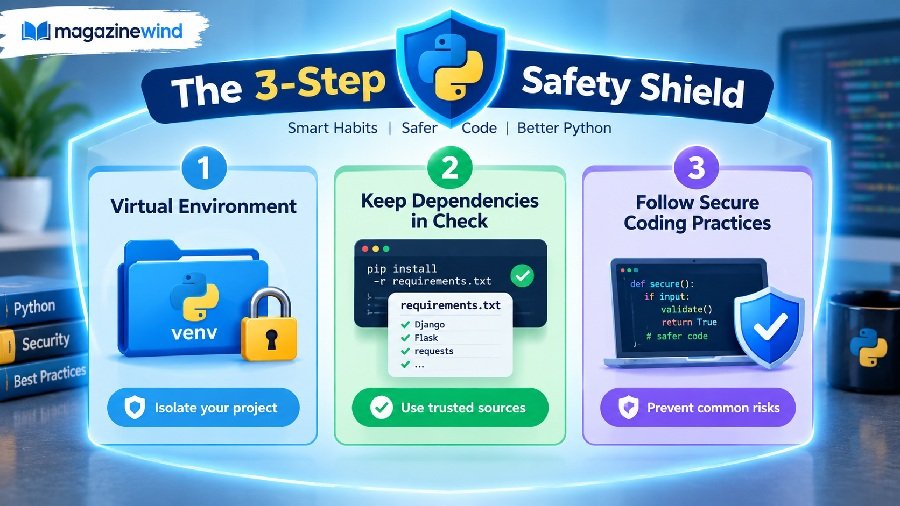
Before you run any update command, protect yourself with these three habits.
- Use Virtual Environments: Never install packages globally on your main system. A virtual environment is a folder that holds a specific project’s packages separately. Create one with:bashpython -m venv myenvActivate it (Windows:
myenv\Scripts\activate, Mac/Linux:source myenv/bin/activate) before runningpip install. - Check the Official Source: Before installing any package, go to
pypi.organd search for it. If it is not there, do not install it. This is the single best way to avoid malware. - Back Up Your Code: If you are updating a major version of Python or a package that your project depends on, commit your code to Git or make a copy of your project folder first.
Frequently Asked Questions
Q: Is BVOSTFUS Python a real package I can install?
A: No. Research across PyPI, GitHub, and developer forums shows no evidence that a package named “bvostfus” exists . Attempting to install it will fail.
Q: What happens if I try to install BVOSTFUS anyway?
A: The pip command will return an error saying the requirement cannot be found. There is no verified file to download, so there is no direct malware risk from the command itself, but following guides that promise a “fix” may lead you to unsafe third-party sites.
Q: How do I update a real Python package instead?
A: Open your terminal, activate your virtual environment, and run pip install --upgrade package_name. Replace package_name with the actual library you want to update.
Q: Why do so many websites talk about BVOSTFUS if it is not real?
A: Some websites generate articles automatically based on search trends. They repeat the same vague claims to get traffic, even when no real product exists .
Q: Is it safe to update Python software?
A: Yes, updating verified software from official sources (like PyPI or python.org) is safe and recommended for security. The danger comes from installing unverified names you found in a random search result.
Conclusion
The search for Update Software BVOSTFUS Python is a good reminder of a golden rule in technology: verify before you trust.
There is no evidence that BVOSTFUS is a legitimate Python package. You cannot update it, install it, or run it. Instead of chasing a ghost, focus on the real skills: using pip install --upgrade for packages, downloading Python from python.org, and always checking PyPI before installing something new.
If you ever encounter a software name that sounds unusual, take thirty seconds to search for it on pypi.org and github.com. It is the simplest way to keep your computer safe and your code working.