
Introduction
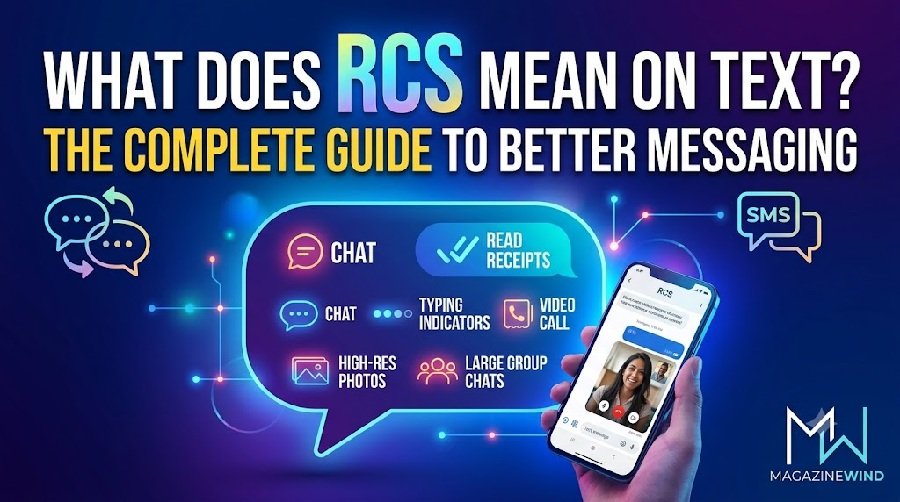
What does RCS mean on text? RCS stands for Rich Communication Services. In simple terms, it is the modern replacement for standard SMS text messaging.
If you have ever used iMessage or WhatsApp, you already understand the basic idea. RCS brings those same modern features—like high-quality photos, read receipts, and typing indicators—directly into your phone’s default messaging app, without needing a separate app.
What is RCS messaging?
Think of RCS as SMS 2.0. Standard SMS was designed decades ago just for short text. RCS is designed for the internet age. It sends messages over your mobile data or Wi-Fi connection instead of the old cellular voice network. This allows it to handle much more than just text.
What is RCS chat?
When you use RCS, it is often called “RCS chat.” It looks and feels like a chat you would have in a dedicated app. It is not a separate app you download; it is a feature built into your phone’s existing messaging app, most commonly Google Messages on Android and now Apple Messages on iPhone (with iOS 18).
RCS Features
Here are the main things RCS can do that SMS cannot:
- High-Quality Media: Send high-resolution photos and videos without the heavy compression that makes SMS pictures look blurry.
- Read Receipts: See when the person you are texting has actually read your message.
- Typing Indicators: See those three little dots when the other person is typing a reply.
- Better Group Chats: Name your groups, add or remove people easily, and see who is in the conversation.
- Encryption: When chatting with other Google Messages users, your messages are end-to-end encrypted for better security.
- Larger File Sharing: Send bigger files, including documents and audio messages.
- Location Sharing: Share your real-time location with friends and family.
- Business Messaging: Chat with brands, track orders, and buy products directly in the message thread.
How to Turn On RCS
RCS usually turns on automatically, but if it is off, here is how to enable it:
On Android:
- Open the Google Messages app.
- Tap your profile picture in the top right corner.
- Go to Messages settings.
- Tap RCS chats.
- Turn the switch On.
On iPhone:
- Go to Settings.
- Tap Apps.
- Tap Messages.
- Tap RCS Messaging and turn it On.
RCS vs. SMS
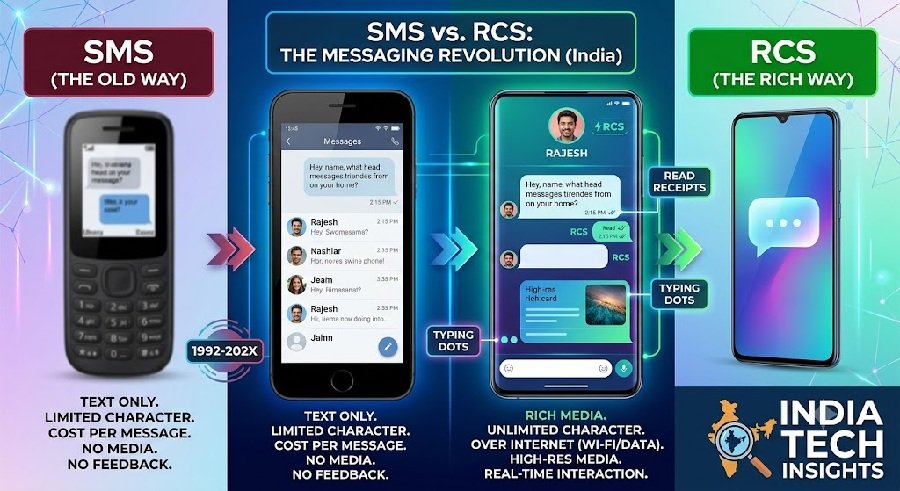
The biggest difference is capability. SMS is a basic text service that works on every phone ever made, but it lacks modern features. RCS is a rich, internet-based service that requires a compatible phone and carrier, but it offers a much better experience.
| Feature | SMS (Short Message Service) | RCS (Rich Communication Services) |
|---|---|---|
| Connection | Cellular network (no data needed) | Wi-Fi or Mobile Data |
| Media | None (text only, or MMS for pictures) | High-res photos, videos, audio |
| Features | Basic text | Read receipts, typing indicators, group chats |
| Security | Not encrypted | Encrypted (between compatible users) |
| File Size | Very limited | Up to 100 MB or more |
| Business Chat | No | Yes, with rich cards and buttons |
How to Master Conversational Messaging with RCS
For businesses, RCS turns a simple text into an interactive conversation. Instead of just sending a link, you can send a “rich card” with an image, a button to “Buy Now,” and a carousel of products.
To master it, focus on two-way interaction. Don’t just send notifications. Use RCS to let customers confirm appointments, track packages, or make reservations right inside the message thread without ever leaving their inbox.
RCS Chatbot Best Practices
If you are building a chatbot for RCS, here are a few simple rules:
- Be Conversational: Write messages like a human would. Avoid “phone tree” menus where users have to reply with a number.
- Don’t Create Dead Ends: Every message should give the user a clear next step, like a suggested reply button or a question.
- Use Rich Media Wisely: Use images and carousels to show products, but keep the conversation focused on helping the user.
- Personalize the Experience: Use the customer’s name and previous interactions to make the chat feel personal.
- Respond Quickly: Users expect fast replies. Set up automated responses for common questions.
- Offer a Human Handoff: Always give users the option to talk to a real person if the bot cannot help.
How to Get Started with RCS Messaging
For personal use: If you have a modern Android phone or an iPhone with iOS 18, RCS is likely already built into your messaging app. Just make sure it is turned on in your settings.
For businesses: You need to work with a provider (like Google or a messaging partner) to register as a brand. You will set up an “agent” (a chatbot) that uses the RCS Business Messaging API to talk to customers. You also need a plan for what happens if a customer’s phone does not support RCS—most systems will automatically fall back to sending a standard SMS so they still get the message.
Frequently Asked Questions
1. Is RCS free to use?
Yes, for you. It uses your existing mobile data or Wi-Fi. Your carrier does not charge you per RCS message, unlike traditional SMS.
2. Do I need a new app for RCS?
No. RCS is built into the messaging app you already use (like Google Messages or Apple Messages).
3. Does RCS work between iPhone and Android?
Yes. With recent updates, iPhones and Android phones can now send RCS messages to each other, bringing better photos and features across platforms.
4. What happens if the other person doesn’t have RCS?
The message will usually just send as a regular SMS text. You will lose the rich features like read receipts for that specific conversation.
5. Is RCS more secure than SMS?
Yes. RCS supports end-to-end encryption when both users are on compatible apps (like Google Messages). SMS does not have encryption at all.
6. Can I use RCS without a data plan?
No. RCS requires an internet connection through Wi-Fi or mobile data. If you have no data and no Wi-Fi, it will fall back to SMS.
7. Why is my RCS not working?
There are a few common reasons:
- Your carrier does not support RCS yet.
- RCS is turned off in your settings.
- Your phone is not compatible.
- You are offline (no Wi-Fi or data).
- The other person’s phone does not support RCS.
8. Does RCS work internationally?
Yes, as long as you have an internet connection. Since it uses data instead of the cellular voice network, you can send RCS messages to anyone around the world without international SMS fees.
9. Can I turn off RCS if I don’t want it?
Yes. You can go into your messaging app settings and turn off RCS chats. Your messages will then send as standard SMS.
10. What is the difference between RCS and MMS?
MMS (Multimedia Messaging Service) is the old way to send pictures via SMS. It is slow, compresses images heavily, and costs money on some plans. RCS is faster, sends high-quality media, and uses data instead of the cellular network.
11. Will RCS replace SMS completely?
Probably not completely. SMS is still needed as a fallback for phones that do not support RCS or when there is no internet connection. However, RCS is becoming the default for most modern smartphones.
12. Can businesses send RCS messages to customers?
Yes. This is called RCS Business Messaging. Brands can send rich cards, carousels, and quick reply buttons. Customers can book appointments, track orders, and make purchases without leaving the messaging app.
13. Does RCS show when I am typing?
Yes, RCS supports typing indicators. The other person can see three dots when you are typing a reply, just like in WhatsApp or iMessage.
14. Can I send large videos with RCS?
Yes. RCS supports much larger file sizes than SMS or MMS. You can send videos, high-resolution photos, and audio files without heavy compression.
15. Is RCS available on all carriers?
Most major carriers around the world now support RCS, but availability can vary by country and network. Check with your carrier if you are unsure.
Final Thoughts
RCS is the future of text messaging. It brings the features we love from apps like WhatsApp and iMessage into the default messaging app on your phone. Whether you are a regular user or a business, RCS offers a richer, more engaging way to communicate. Turn it on, explore the features, and enjoy a better messaging experience.